3 posts tagged with "Audit"

This release includes features or improvements for monitoring, tracking, and auditing user activity.

View all tags

File Control Log Update

ยท 2 min read
MonitorDog Team
MonitorDog Team

๐Ÿš€ MonitorDog's New 'File Control Log' Update

๐Ÿ’ก MonitorDog's file control log becomes more secure and convenient.

๐Ÿ“ข Update Summary

  1. When controlling multiple files at once, logs are now grouped together instead of showing individual file logs.
  2. A new feature has been added to capture screenshots for each control action.

๐Ÿ”„ What's Changed?โ€‹

๐Ÿ“‚ Grouped Log Display for Multiple File Controlsโ€‹

When users perform file control actions such as moving or deleting multiple files at once, logs are now displayed as a single grouped action instead of creating individual logs for each file. This makes the log list much more concise and allows administrators to easily understand file control activities. If needed, detailed logs for each file can be viewed by clicking on the action.

๐Ÿ“ธ Screenshot Recording Feature Added for File Control Actionsโ€‹

Through the newly added screenshot recording feature, monitor and webcam screens can be captured when users perform file control actions such as moving or deleting files. This feature greatly helps in understanding the context of file control activities and can be useful for security audits.

Important Notesโ€‹

This feature is supported in MonitorDog Agent version 1.0.12 or higher.

Device Connection & File Control Log Added

ยท 2 min read
MonitorDog Team
MonitorDog Team

๐Ÿš€ MonitorDog Adds Device Connection and File Control Log Features

๐Ÿ’ก MonitorDog's detection scope extends to file tracking.

๐Ÿ“ข Update Summary

  1. When controlling multiple files at once, logs are now grouped together instead of showing individual file logs.
  2. A new feature has been added to capture screenshots for each control action.

๐Ÿ”„ What's Changed?โ€‹

๐Ÿ“‚ Log Recording When External Devices Are Connected to PCโ€‹

MonitorDog now records information whenever users connect or disconnect external devices such as USB drives and external hard drives to their PC. Administrators can configure whether external device connections are allowed and whether they should be detected in MonitorDog Admin. This enables transparent monitoring of external device usage history and helps prevent security incidents.

๐Ÿ“ธ File Change Tracking Feature for Connected External Devicesโ€‹

MonitorDog now automatically records file creation, modification, and deletion activities that occur within connected external devices. Administrators can enable this feature by activating file change logging in MonitorDog Admin. This allows transparent tracking of file activities on external devices and can be utilized for security audits.

Important Notesโ€‹

This feature is supported in MonitorDog Agent version 1.0.12 or higher.

Privacy Protection Feature Update

ยท 4 min read
MonitorDog Team
MonitorDog Team

๐Ÿš€ MonitorDog Introduces New 'Privacy Protection & Audit Features'

๐Ÿ’ก MonitorDog, which prioritizes user privacy protection above all else, presents an evolved security feature.

๐Ÿ“ข Major Update
We're excited to announce the official addition of Privacy Protection & Audit Features.

๐Ÿ”„ What's Changed?โ€‹

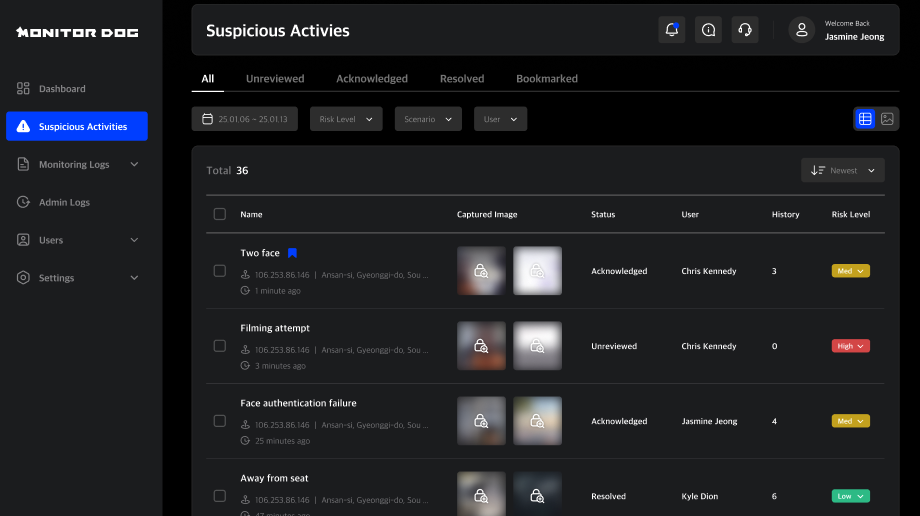
๐Ÿ” From "Allow First, Manage Later" to "Block First, Request Later"โ€‹

โš ๏ธ Previous Approach

When administrators checked user activity events, images were visible by default

  • Quick problem identification
  • โš ๏ธ Risk of unintended exposure of sensitive information

โœ… New Approach

All event images are now private by default

  • ๐Ÿ”’ Default privacy protection
  • ๐Ÿ“‹ Transparent audit process
  • ๐Ÿ“ง Automatic notification system

alt text

๐Ÿ” How Can Images Be Accessed Now?โ€‹

๐Ÿ›ก๏ธ Transparent and Secure 'Security Audit' Processโ€‹

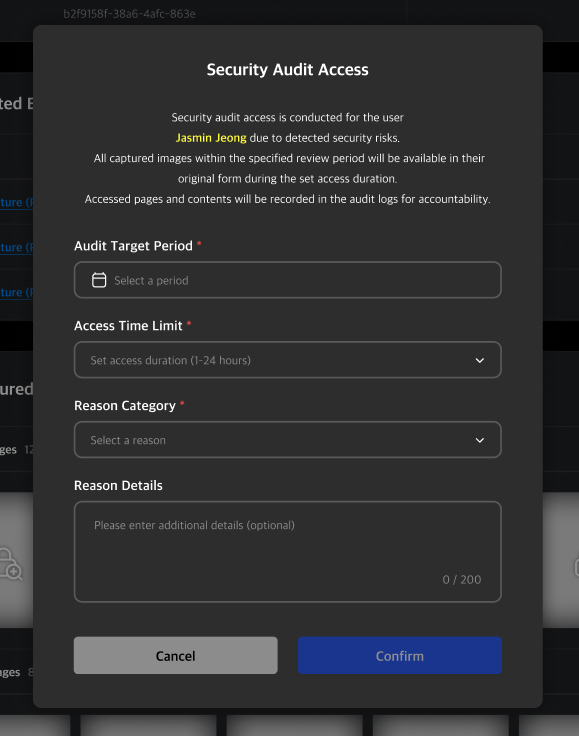
Now, when administrators need to view event images for specific users, they must request a security audit.

โฐ Request-Based Access

Administrators can set audit duration from minimum 1 hour to maximum 24 hours to request image access permissions.

๐Ÿ“ง Transparent Notifications

As soon as the audit begins, an automated email with "Security audit is currently in progress" is sent to the audited user.

๐Ÿ“ Complete Records

Who, when, and why requested an audit, and all events reviewed during the audit are permanently managed in the system.
alt text

๐ŸŽฏ Expected Benefits of 'Privacy Protection & Audit Features'โ€‹

๐Ÿ’ก This new feature goes beyond simply hiding images - it's a significant update that elevates the trust and security level of the entire service.

1๏ธโƒฃ Enhanced User Trustโ€‹

Users will develop strong trust in the service knowing that their sensitive information is protected by default and that they'll be immediately notified if someone attempts to access it. This provides psychological security that "my information is safe," allowing users to use MonitorDog with greater peace of mind.

2๏ธโƒฃ Transparent Internal Controls & Clear Accountabilityโ€‹

Since all audit requests and access records are logged, all administrator activities are managed transparently. This serves as a powerful internal control mechanism that prevents unnecessary information access and enables quick identification of accountability through clear audit records if issues arise.

3๏ธโƒฃ Data Regulation Compliance & Proactive Responseโ€‹

We've established a foundation for proactive compliance with increasingly strict data regulations worldwide, including the Personal Information Protection Act (PIPA) and the European General Data Protection Regulation (GDPR). This reduces compliance risks for our clients and technically demonstrates that MonitorDog is a secure service.


๐Ÿ›ก๏ธ MonitorDog's Promise

MonitorDog will continue to work tirelessly to securely protect your valuable information and provide the most trustworthy service possible.

Thank you.

MonitorDog Team ๐Ÿ’™