Screen Capture Control Feature Update

MonitorDog can now detect screen capture attempts made via keyboard shortcuts or capture software, and records these events for centralized management.
📝 Key Update Highlights
✨ At a Glance
• Detection and logging of capture attempts via keyboard shortcuts
• Blocking of capture attempts via capture software, with event logging
• Support for organization-level and user-level policy configuration
• Administrators can register and manage capture programs directly
🔄 What Has Changed?
📂 1. Screen Capture Control
When the MonitorDog Agent detects a screen capture attempt, it performs the following actions:
- Records and stores the event
- Blocks the screen capture
- Automatically terminates the capture program (when applicable)
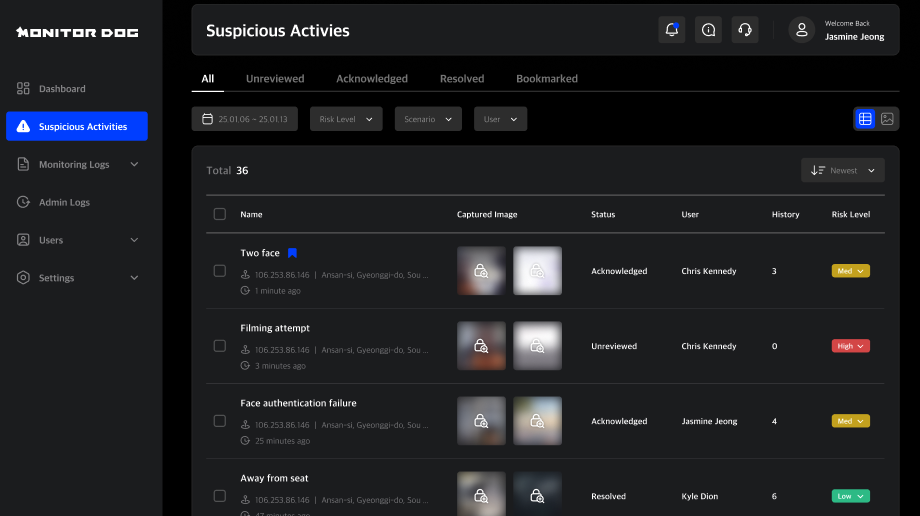
- Saves a screenshot of the attempted capture and the user’s webcam image
→ This allows administrators to clearly identify who attempted a capture, when, and how.
Screen capture attempts are detected in two categories:
- Keyboard-shortcut capture (hotkeys)
- Capture software execution and capture attempts
⚙️ 2. Organization-Level and User-Level Policy Settings
You can apply capture control policies across the entire organization, while also configuring exceptions for specific users who may legitimately require screen capture functionality.
User-level policies take priority over organization-wide policies. However, if the organization updates a policy using the “Apply to all users” option, the organization-level settings will override individual user settings.
⚠️ Important Notice
This feature is available in MonitorDog Agent version 1.0.17 or later.